Looking for testers for Unity MythTV scope
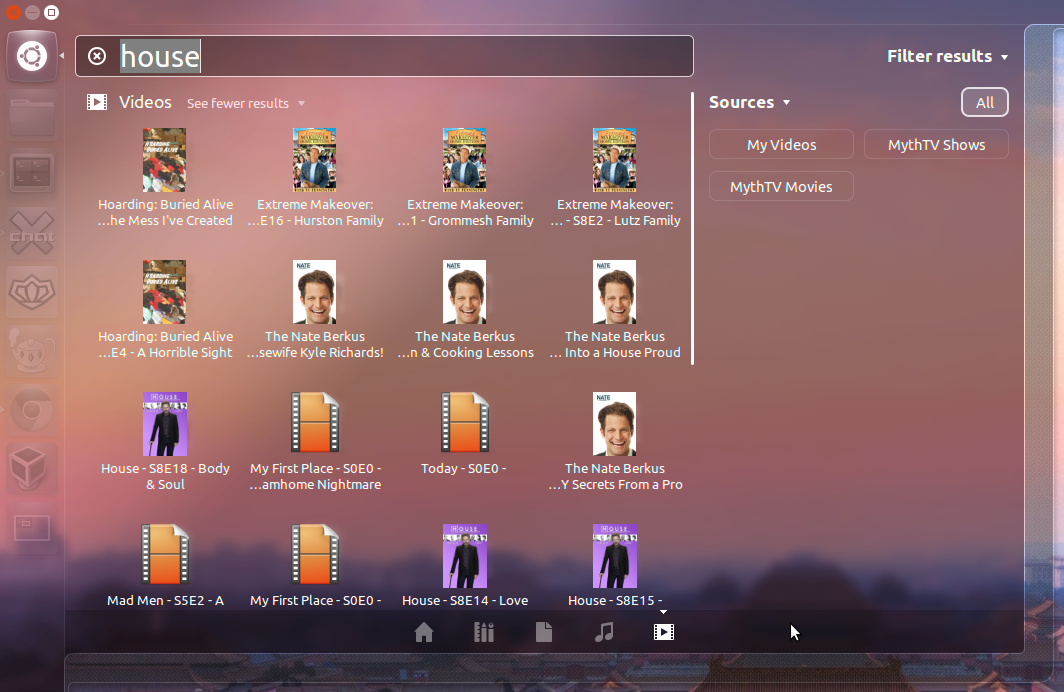
The Mythbuntu team would like to announce unity-scope-mythtv, a scope for searching and playing back MythTV content from Unity. We're currently looking for people to test and provide feedback
Latest Version:
unity-scope-mythtv 1.1-0ubuntu1
Features new in this version:
- Now uses coverart as icon instead of generic video icon (if available)
- Can now playback content from MythVideo
Prerequisites:
- MythTV 0.25 backend (on any distro release)
- Ubuntu 12.04 installed and running Unity (on the machine you want to install unity-scope-mythtv on. Eg. A desktop)
- The unity-scope-mythtv package (grab it here)
Features:
- Automatically finds MythTV 0.25 backend
- Unity filtering available (can filter to just MythTV TV Show or Video content)
- Shows play back in mythavtest (if that isn't installed, uses default video player)
- If using mythavtest, commercial skipping is available
- Uses coverart as icon
- Can playback recordings or content from MythVideo
- Searches Title, SubTitle, and Description fields
Roadmap:
- Configuration utility so content is transcoded on the fly (for slower machines/links). This will be a per desktop user setting.
Known issues:
- Shows are not automatically marked watched in MythTV (they might actually be if using myavtest)
- mythavtest doesn't cover Unity bar in fullscreen mode
Steps:
- Install unity-scope-mythtv on your 12.04 desktop by running 'sudo dpkg -i unity-scope-mythtv_1.0-0ubuntu0_all.deb'
- This may give dependency errors since you aren't using apt to install, so you may need to also run 'sudo apt-get -f install'
- Reboot the machine
- Login and open Unity search (eg. hit the super key)
- Click the Videos lens icon in Unity (should be on the far right) and search for a recorded show. Clicking on a recorded show should open it up in the default video player or in mythavtest if it is installed
Feedback:
Please send feedback to our mailing list or visit us in our IRC chatroom on freenode ( #ubuntu-mythtv-dev )
Screenshot: